


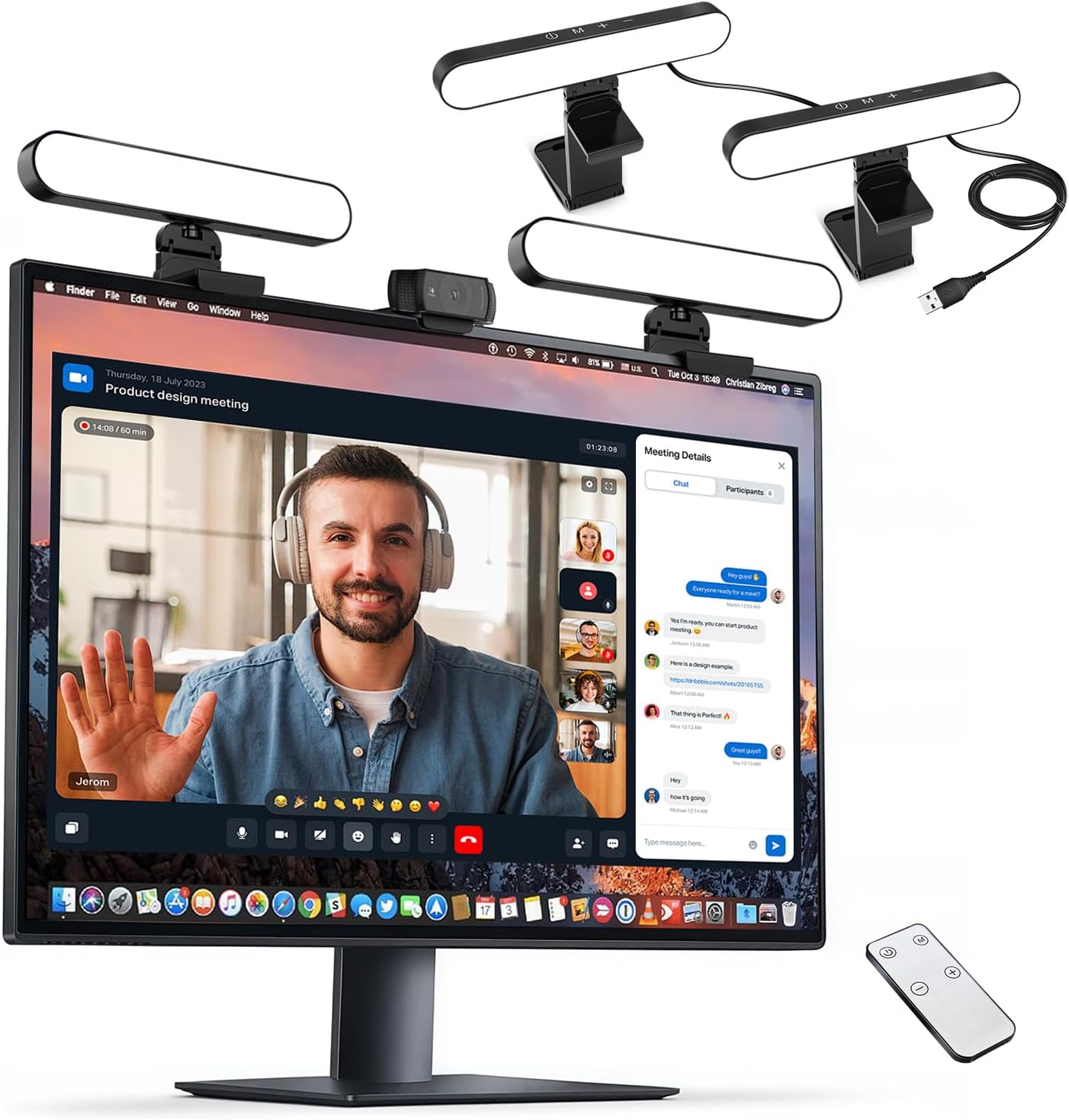


yAyusi Dual-lamp Video Conference Lighting, LED Streaming Light with Remote and Touch Control, Zoom Lighting for Computer,Webcam Laptop Monitor Ring Light for Video Calls/Zoom Meetings/Video Recording
$3,727.07
Price: INR3,727.07
(as of Nov 02, 2025 02:58:52 UTC – Details)
Product description
yAyusi Dual-lamp Video Conference Lighting, Best Lights for Zoom Calls
【Dual Webcam Light for Video Calls】 Different from the laptop light for video conferencing on the market, our computer lighting for video conferencing are composed of two stream light bars for monitor, providing brighter and more even camera light, bringing you a more professional podcast light effect and showing your best. The zoom light for video recording is also equipped with two control modes, you can control it by touch or remote control
【Rotatable and Easy to Install】 Our webcam lighting for video conferencing adopts a rotatable design, supporting 360° horizontal and 180° vertical rotation, with a wider lighting area to meet your different needs. The webcam ring light for streaming can be installed horizontally or vertically, the entire computer ring light for zoom meetings set can be installed within 1 minute, and can be removed as a whole for standby use
【3 Color Modes and 10 Levels of Brightness】 Our zoom lighting for home office adopts eye protection technology, the light is soft, natural and flicker-free. The in a meeting light for computer video conferencing provides 3 color modes and 10 levels of brightness, you can set the zoom call lighting atmosphere according to the environment. No matter where you are, this ring light for laptop zoom meetings can perfectly present you
【Expandable and Multi-Purpose】 The ring lights for computer monitor laptop supports 5.5-8.3″ in height and 1.55-2.35″ in width adjustment, suitable for most devices. The video call light for webcam meetings has two usage modes (clip-on/desktop light), and can also be used as a lighting for zoom calls, podcast lighting, key lights for streaming,video call lighting for desk etc. The desk lights for video calls has built-in sponge pads, which will not scratch the device when moving
【Packing List and After-Sales Service】 Package includes: 2 video conference lights, 2 light stands, 1 remote control, 1 adapter, 1 cable, 1 wire tie, 4 wire buckles, 1 user manual. Our goal is to satisfy every customer, if you are not satisfied, we will provide 100% refund. yAyusi video conference lighting kit provides 24 months of after-sales service, if you have any questions, you can contact us at the first time
Customers say
Customers find the lighting quality positive, with customizable options and good value for money. They appreciate the remote control feature, with one customer noting it works well for controlling both lights simultaneously. The brightness and functionality receive mixed reviews – while customers can adjust the lighting, some mention the brightness is not as advertised, and some report that the lights stop working. The color temperature control feature is well-received.



TG –
Review of LED Monitor Mounted Lights
LED monitor mounted lights come in various designs, often featuring sleek, modern aesthetics that complement contemporary setups. Many models are adjustable in brightness and color temperature, allowing you to customize the lighting to your preferences. The slim profile helps save desk space and avoids clutter, making them a stylish addition to any workstation.These lights typically offer a range of features that enhance your viewing experience. Common functionalities include:- **Adjustable Brightness**: Most models allow you to adjust the brightness levels to suit different tasks, whether you’re reading, working, or gaming.- **Color Temperature Control**: Many lights allow you to switch between warm and cool light settings, which can reduce eye strain and improve focus.- **USB Powered**: Many LED monitor lights are USB-powered, making them easy to connect to your monitor or computer without needing additional outlets.- **Smart Features**: Some advanced models come with smart features, such as app control or integration with smart home systems.Installation is usually straightforward. Most LED monitor lights come with clip-on designs that easily attach to the top of your monitor. They often include adjustable arms or swivel bases, allowing you to direct the light where it’s needed most. The process typically takes just a few minutes and requires no additional tools.In terms of performance, LED monitor mounted lights generally provide excellent illumination without flickering or harsh glare. They enhance visibility for tasks such as reading or gaming while minimizing shadows on your desk. Additionally, the energy efficiency of LED technology ensures that they consume less power, which is a plus for both your electricity bill and the environment.#### Pros and Cons**Pros:**- Space-saving design- Adjustable brightness and color temperature- Easy installation- Energy-efficient- Reduces eye strain**Cons:**- Some models may not be bright enough for larger workspaces- Limited range of motion depending on the design- May not suit all monitor sizes or stylesOverall, LED monitor mounted lights are a fantastic addition for anyone looking to enhance their workspace or gaming setup. With their stylish design, customizable lighting options, and ease of installation, they effectively improve productivity and comfort. Whether you are an office worker, a gamer, or a student, investing in a quality LED monitor mounted
Raul –
They work well for the price point!
Surprisingly, they work well even with my lightbar still attached. That was a pleasant surprise, and because of that, I’m definitely keeping them. I’d say they are worth what you pay. They offer good value for the price and get the job done.They are not high-end studio lights, and the diffusion is not perfect, but they include three color modes and around seven or eight brightness levels. Each light works independently, but both run off a single USB port and outlet, which is very convenient. The remote works well and syncs the lights instantly.Overall, I would recommend these. Just do not expect professional film studio lighting. I also have a window behind my monitor that provides natural light, but even with that, these lights help a lot.
Sarah –
Powerful light
I have these on top of my vanity mirror and I love how they work. I do use both lights at once. Occasionally one of the lights won’t turn on and I have to unplug and plug back in an again one or two times to get it working again, but otherwise no problems.
Abigail –
Transform Your TEAMS/ZOOM Meetings with These Game-Changing Lights!
I work in a room in my house that only has one overhead light, so my lighting on TEAMS was terrible. But then I picked up a new webcam and decided to try out some additional lighting. These lights are amazing! They completely transformed my setup, and the difference is incredible. They were super easy to install and set up. The wireless remote is a game-changer—so convenient and works perfectly to turn the lights off when my meeting is over. I couldn’t be happier with this purchase!
Charles Fulton –
Better than the donut light for use with a computer or laptop
These are great. I do a lot of conference calls and need better lighting. I had the donut light but it was too bulky for a computer. This fits perfectly above my screen and provides the perfect light.
Christin Cousineau –
glitchy
if I use the remote it does not work and if I go ahead and use it manually on on both lights one would turn on and the other would not work Also, both does not turn on, someone one would turn off. or the other would be glitchy. I thought its cool to have an option of getting outlet wall plug or connect it with usb only to the computer. unfortunately, I missed my return window so money wasted here.
Nick –
Great value for new content creators!
Got these set up with my gaming set up for streaming (NikeSimz on Twitch – shameless plug). Works great, easy to set up, different modes and brightness work really well. Great value for small content creators starting up.
Daniel Cabral –
Functional, but not perfect.
The good:BrightnessVersatileThe Bad:Controls are oversensitiveInconsistent changes when trying to change both lights at once with the remoteNeeds a dedicated power brick, will overwhelm a PC USB port or USB dock (even a powered one)The Ugly:Used in vertical configuration, the balance is awful and will fall over.I do like these lights. I use them both for lighting when streaming or doing meetings at work. I also like to tilt them forward to use as desk lamps when not on camera. Thing is, they don’t really work for that in horiztonal mode. In vertical mode, if you fold them forward, they’ll fall off the monitor, no matter what. And if they’re not folded forward, the hinge doesn’t have the strength to hold them at almost any angle that isn’t straight up, so they’ll fold themselves forward….and then fall over. I ended up strapping my down so they’ll stay on the monitor, but some changes could be made to fix the balancing issues.The only other issues I’ve had have been with the controls. The touch controls on the lights themselves are SUPER sensitive, so trying to adjust the angle of the light tended to change something. And using the remote to change both sometimes doesn’t register with one or both lights, meaning more work to get them back to the same settings. Also, these need their own power brick. Plugging them into a powered USB hub, at a certain brightness level, one or both of the lights stop working.
Sobasa –
They are ok.
Santos Santos –
Muy bueno
Amazon Customer –
Great light source. Thus far I have used them as indirect lighting for my on line meetings.
Jim Knopf –
Ein sehr gutes Leuchtenset für Online-Meetings. Die Steuerung der Lichtfarbe ist toll um ein harmonisches Ergebnis mit dem Umgebungslicht zu bekommen, und die Helligkeit ist auf höchster Stufe schon fast zu viel – aber es lässt sich alles regulieren, und deshalb – PRIMA!
Amazon Customer –
The lights work well and can be places in various configurations. I do find they are quite floating and distracting, making my laptop screen seem darker at times. Use a lower brightness of this happens to you.